 3DP Hub
How to change CFS filament temperature
Published
A workaround for changing the CFS purge temperature and tricking the printer into using Creality RFID tags with non-Creality filaments.
Search
Configuration guidelines
In this project you will need to make changes to the configuration files. On a Creality K1 Series printer, this requires root access. Read the links below to learn how.
1. Configuration file changes
0%
1.
SSH into your printer using MobaXterm (or similar SSH client)
This requires root access. Read the Root Access Quick Start Guide if you need help.
2.
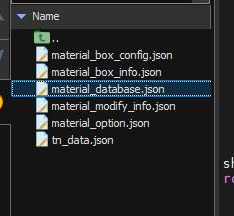
Navigate to usr/data/creality/userdata/box and create a backup of material_database.json
The best way is to download the file to your computer
3.
Open material_database.json
4.
Search for the filament you want to change the temperature of
5.
Change nozzle_temperature and nozzle_temperature_initial layer
Note that the temperature is also mapped to the flow rate and you may have to adjust the flow and range values accordingly.
6.
Save the config
7.
Restart the printer
If you mess something up, simply restore the backup